For nearly two decades, Wealthy Affiliate operated as a foundational cornerstone of the online business education space. However, as the digital landscape shifted rapidly toward artificial intelligence, search engine algorithms matured, and creators grew exhausted by “software fatigue”- the frustrating necessity of stringing together separate subscriptions for web hosting, keyword research, text editors, AI writers, and graphic design tools- the traditional learning model faced a tipping point.
October 09, 2026 marks a very momentous day in the evolution of Wealthy Affiliate.
Executive Summary – Launch Pivot Version 1.0
Published October 12, 2026.
Paul Mindra | AI Integrity Auditor/Digital Creator.
The launch of the newly overhauled platform marks a fundamental pivot in the company’s philosophy. Wealthy Affiliate has transitioned from a legacy, step-by-step training course into a highly integrated AI-native business operating system. By embedding contextual intelligence directly into the server infrastructure and content creation workspaces, the platform aims to eliminate workflow fragmentation, lower technical barriers for beginners, and accelerate production speed for advanced digital publishers.
At the absolute center of this monumental upgrade is Ace, a persistent AI co-founder and personal business assistant. Unlike general standalone language models that require users to repeatedly copy and paste context about their audience, Ace maintains a 360-degree memory of the user’s specific brands. Integrated seamlessly into the dashboard’s sidebar, it dynamically shifts its memory based on whichever website property the user is currently working on.
Rather than forcing users through rigid, one-size-fits-all text modules, the new “Learn” environment uses Ace to deliver non-linear, interactive training. The onboarding process is entirely conversational; users brainstorm their niche, select brand identities, and establish comprehensive business blueprints through low-friction dialogue. Ace then tracks real-world milestone execution, providing custom, on-demand sub-tutorials (such as building platform-specific social media game plans) tailored strictly to the user’s active domain assets.
Operational management is anchored inside the reimagined “My Businesses” dashboard (which completely supersedes the older “Hubs” concept). Here, distinct web properties are organized into visual tiles. Selecting a brand tile instantly configures the workspace’s entire content deck, keyword vaults, and analytics to match that specific niche.
When it comes time to create, users transition into the Studio interface – a centralized workspace where all digital assets live side-by-side.
Let’s take a detailed auditor-perspective deep-dive :
Table Of Contents
Phase 1: The Core Engine – Ace AI & Contextual Strategy
On October 09, 2016, Co-founder Kyle Loudoun announced the launch of this completely “reinvented” experience, which transitions the platform from a traditional affiliate marketing course into a deeply integrated, AI-assisted business building environment
Because this is a massive infrastructural launch, the founders have openly noted that the rollout will continue in phases over the next couple of weeks as older UX components migrate and initial bugs are resolved. That is why I call this Launch Pivot Version 1.0.
Published October 12, 2026.
Ace AI Co-Founder: --->
The platform’s new AI assistant, Ace, acts as an interactive partner. Unlike standard standalone AI chatbots, Ace is designed to dynamically understand your specific website, goals, content strategy, and unique writing voice.
'My Businesses' (Formerly Hubs): --->
A streamlined operational dashboard where users can map out strategies with AI agents doing the underlying heavy lifting.
Reimagined Learn Environment: --->
Core training has received a full interface facelift. The curriculum shifts away from fixed paths to prioritize personalized, interactive training based heavily on what your specific online business needs at that moment.
Revamped Social & Gamification: --->
The platform has launched updated Leaderboards to track community contributions and rankings, alongside an optimized Quick Actions Menu for immediate blogging, research, and technical support.
Comparison: Old vs. New Platform Workflow
Feature Area
The Old Experience
The New Platform Experience
Training Structure
Rigid, sequential text and video modules.
Dynamic, personalized, and AI-integrated modules.
AI Capabilities
Disconnected standalone text and image tools.
Ace, a contextual AI assistant baked directly into your sidebar.
Site Management
Segmented “Hubs” management dashboard.
“My Businesses” layout driven by automated AI workflows.
Ace is Wealthy Affiliates new persistent AI co-founder and personal assistant.
Unlike standalone chatbots like ChatGPT- where you have to repeatedly paste context about your audience, brand, and niche – Ace is integrated directly into the sidebar of the platform. It maintains a continuous, 360-degree memory of your specific business, websites, and content history.
1. Contextual Business Awareness --->
Ace is tied directly to your “My Businesses” dashboards (formerly Hubs). It reads your business profile, target audience, and niche. If you run multiple websites, you can manage separate threads; Ace automatically switches context depending on which site or brand asset you are currently optimizing.
2. Tailored Training & 'Next-Step' Guidance --->
Instead of forcing you to follow a rigid, step-by-step course layout, Ace acts as a real-time coach. You can ask it, “What should I work on next?”, and it will scan your business progress, detect unfinished content game plans, and outline your immediate tasks. It can even turn your questions into custom, step-by-step tutorials customized to your niche (e.g., teaching you how to make YouTube Shorts specifically for a pet care blog).
3. Unified Content & Channel Strategy --->
Ace powers the backend engine of your content creation. It handles multi-channel tasks from a single chat pane: • Brand Setup: Suggests niche selections and creates personalized business blueprints.
• Research & SEO: Uncovers what your specific audience is searching for on Google.
• Writing Style Preservation: Learns and mirrors your specific writing voice so generated outlines and drafts match your personal brand.
• Social Media Workflow: Automatically maps out caption ideas, image graphics, and pin concepts for platforms like Instagram, Pinterest, and X based on your blog content.
4. Interactive Onboarding --->
For new users, Ace replaces traditional setup forms. It uses a low-friction, conversational onboarding process to help beginners choose a niche, establish a basic content strategy, and build a game plan before they even touch a website dashboard.
Setting up a custom writing voice is one of the most practical parts of the new Wealthy Affiliate Platform. Instead of generating generic, robotic text, Ace actively learns how you construct arguments, use punctuation, and speak to your readers.
The voice setup is handled within the platform’s backend ecosystem.
1. The Core Philosophy: Real Text Over Prompts --->
Rather than asking you to fill out complicated text prompts or choose generic descriptors like “write in a professional yet witty tone,” Ace relies on real evidence. The system analyzing your actual writing style yields the most authentic results.
The Learning Engine (What Ace Looks At)
o Your Published Content: Founders Kyle and Carson addressed early alpha tester feedback by ensuring Ace doesn’t just read your unedited, rough first drafts. Instead, Ace prioritizes published articles that you have already fully edited, structured, and polished in your content editor or WordPress dashboard.
o Business Hub Matching: Your writing voice is mapped directly to your specific business profiles inside the “My Businesses” dashboard.
2. Multi-Brand Voice Segregation --->
If you operate multiple web properties (e.g., a formal finance blog and a highly casual pet care review site), you are not forced into a single box. You can program and lock in a completely distinct writing voice for each individual website and hub.
Step-by-Step Workflow Overview --->
• Step 1: Navigate to your active business hub dashboard.
• Step 2: Open the Ace AI panel in your sidebar or click your business profile settings.
• Step 3: Feed Ace a selection of your favorite published articles, or allow it to crawl your connected live site to establish a baseline.
• Step 4: Name and save your custom writing voice profile.
Once saved, every time you use Ace to generate an initial content outline, research brief, or article draft inside that hub, it automatically injects your saved style parameters directly into the AI’s generation matrix.
When you pivot your marketing from search engine optimization (SEO) blogging to social media, Ace pulls your saved brand identity and custom writing voice from the core website hub and cross-applies it seamlessly across multiple platforms.
This process takes place inside Wealthy Affiliate’s new Studio content creation area, specifically designed to stop you from bouncing between separate text apps, image generators, and browser tabs.
Ace does not just copy and paste your long-form blog paragraphs onto social networks. Instead, it extracts the thesis of your article and rewrites it to fit the cultural context of each platform while maintaining your exact vocabulary, tone constraints, and punctuation habits:
• Instagram: Ace will structure the text into an engaging, visual-first hook, complete with line breaks, relevant niche hashtags, and a clear call-to-action (CTA) to click the link in your bio.
• X (formerly Twitter): Ace automatically breaks your article down into a high-engagement multi-post thread, organizing your core arguments into bite-sized, punchy statements that match how you naturally construct short phrases.
• Pinterest: It switches into an inspirational, search-optimized format, drafting keyword-heavy descriptions and titles tailored for save-rates.
2. Multi-Channel Visual Asset Alignment --->
Through the built-in Ace Artist system, the platform pairs your text voice with your brand’s visual identity. When you prompt Ace to generate assets for a social media game plan, it simultaneously designs matching visual content within your Studio project dashboard:
• Custom Instagram story graphics and post images.
• Vertical Pinterest Pins tailored to your niche.
• YouTube Thumbnails if your strategy involves video scripts.
3. The Centralized 'Studio' Hub Workflow --->
Instead of assets getting lost across your desktop, everything is anchored under a specific business asset profile inside your Studio. This means you can open a single tab, see the original blog post, view the generated Instagram captions, and pull up the accompanying images side-by-side.
Important Operational Detail: At launch, social media publishing remains manual. While Ace builds the complete captions, threads, and graphics, you still have to copy-paste or upload them to your social channels yourself. Wealthy Affiliate has stated that API connectors for direct, automated scheduling are currently undergoing platform approval processes and will roll out in a later phase.
How Ace uses your voice to build YouTube or Video-short outlines
When transitioning your written voice into video formats like YouTube videos or Video Shorts (TikTok/Reels), Ace uses its contextual memory to bridge the gap between text and video.
Instead of just spitting out a generic video script template, Ace analyzes your saved writing identity and creates highly customized, actionable video execution outlines.
1. Translating Your 'Writing Voice' into a 'Speaking Hook --->'
Written logic doesn’t always translate perfectly to spoken audio. People drop out of video shorts in the first 3 seconds if they aren’t immediately gripped.
• The Adaptation: Ace reads your established brand identity (e.g., highly informational, humorous, or analytical) and restructures your main points into verbal hooks that match your personality.
• If your writing voice is conversational and casual, Ace will draft an intro that sounds natural to you, rather than overly scripted or formal.
2. Tailored Niche Scripting & Training --->
Because Ace understands your exact business niche, it designs video blueprints wrapped around your real-world assets. If you ask Ace, “How can I use YouTube Shorts to promote my latest blog post?”, it doesn’t just offer a generalized social media marketing lesson.
• It analyzes your published article.
• It crafts a step-by-step video script tailored to that specific article’s subject matter.
• It builds visual cues, timing instructions, and overlay text ideas optimized for your target audience.
3. Anatomical Breakdown of a Generated Outline --->
When you use Ace inside the Studio workspace to construct a YouTube or Short outline, it delivers a structural production blueprint:
• The Hook: A customized 3–5 second opening line tailored to your specific audience.
• The Core Value Points: Your written article arguments boiled down into concise, punchy, spoken bullet points.
• B-Roll & Visual Directives: Side-by-side contextual notes suggesting what to show on screen while speaking (e.g., “Insert close-up shot of the product here”).
• The Visual Voice CTA: A call-to-action tailored to your natural style, guiding viewers to visit your site or subcribe without sounding overly aggressive.
4. Continuous Multichannel Synergy --->
Because the outline is saved inside your business profile, your text, images, and video assets all live together. If you choose to expand a Short into a long-form YouTube video later, Ace references the prior project file to ensure your tone, terminology, and branding remain perfectly consistent across your entire digital footprint.
To understand how Wealthy Affiliate rations Ace’s power, it helps to look under the hood at the relationship between Daily Ace Messages and Monthly AI Credits. These are the structural limits and tokens that keep the platform running smoothly.
1. The Interaction Limit: Daily Ace Messages --->
Think of this as your conversational cap. To protect server bandwidth and prevent spam, the platform restricts how many individual text prompts you can send to the Ace sidebar in a 24-hour cycle.
• How it works: Every time you ask Ace a question, ask for advice, or request a quick content tweak, you consume 1 Message.
• The Reset: This limit refreshes every single day at midnight.
2. The Content Token: AI Credits --->
While “Messages” limit how much you can talk to Ace, AI Credits are the internal “tokens” or currency that dictate how much content your writing and image agents can actually produce.
• How it works: When Ace moves beyond simple conversation and begins processing compute-heavy requests (like generating a structured 2,000-word blog draft, designing a Pinterest pin via DsgnPop, or spinning up a multi-point YouTube script), it consumes AI Credits.
• The Weight System: Not all tasks cost the same. A simple keyword suggestion or short social media hook costs very few credits, whereas generating a comprehensive, highly research-driven article draft draws heavily from your pool.
• The Reset: Your monthly pool of AI Credits refills exactly on your subscription anniversary date (not the 1st of the calendar month).
Plan Tier
Daily Ace Chat Messages
Monthly AI Credit Token Pool
Starter (Free)
Up to 20 messages / day
4,000 credits (One-time starter pack)
Builder Plan
Up to 100 messages / day
20,000 credits / month
Premium Plan
Up to 100 messages / day
40,000 credits / month
Premium Plus+
Up to 200 messages / day
100,000 credits / month
If you burn through your content generation tokens early because you are building out a massive multi-channel social campaign, your daily chat won’t necessarily stop, but you will need to buy a top-up bundle of standalone AI credits to generate more deep text or media assets.
Additional replacement AI credits are acquired as “top-up bundles” directly inside the platform dashboard.
Wealthy Affiliate does not charge a standard per-credit flat fee; instead, it uses a tiered bulk-purchasing model. The specific pricing structure depends on the size of the bundle you buy:
1. Cost of Extra AI Credit Bundles --->
While exact pricing can occasionally fluctuate based on promotional periods, the platform traditionally structures its on-demand top-up bundles into the following tiers:
• Small Top-Up: $5.00 for 5,000 AI Credits ($1.00 per 1,000 credits)
• Medium Top-Up: $15.00 for 20,000 AI Credits ($0.75 per 1,000 credits)
• Large Top-Up: $25.00 for 50,000 AI Credits ($0.50 per 1,000 credits)
2. How They Are Acquired --->
You can purchase these replacement tokens directly using two primary methods within your account workspace:
• Credit Card or PayPal: You can pay for bundles immediately using the active billing method attached to your subscription.
• Using Internal Cash Credits: If you have accumulated Cash Credits from the Wealthy Affiliate reward ecosystem (such as helping other members, site feedback, or affiliate earnings), you can convert those internal rewards directly into AI top-up bundles instead of cashing them out to PayPal.
Whenever you are working with Ace or the Studio tools and your balance drops to near-zero, a prompt will automatically appear allowing you to select and apply a top-up bundle instantly to prevent your workflow from pausing.
The term “tokens” is often used in the broader tech world to describe how language models process text, but inside Wealthy Affiliate’s new ecosystem, they specifically use AI Credits. To clear up any confusion, Wealthy Affiliate actually splits its platform currency into three distinct credit types, and they serve completely different purposes:
1. AI Credits (The 'Content Fuel') --->
When we talk about using Ace to build social media game plans, blog outlines, or video scripts, you are spending AI Credits.
• How they work: Think of these as the electricity that powers Ace. Every time Ace generates a script, research brief, or piece of copy, a set amount of AI Credits is deducted from your monthly allowance.
• The new allowances: Under the revamped pricing tiers, a free Starter account gets a one-time allotment of 4,000 credits.
Upgraded accounts get recurring monthly pools:
20,000 credits on the Builder tier,
40,000 credits on Premium, and
60,000 credits on Premium Plus+.
2. Cash Credits (The Real Money) --->
This is Wealthy Affiliate’s internal financial currency.
• How they work: Each Cash Credit is worth exactly $0.50 USD.
• What they are for: You earn these through the affiliate program or specific internal platform rewards. You can either cash them out directly to your PayPal account on the 1st of the month or use them inside the system to buy custom domains or purchase community engagement services.
3. Community Credits (The Engagement Points) --->
These are non-monetary points tied to platform gamification.
• How they work: You earn these by participating in the live chat, writing blog updates for the community, or answering help tickets. They dictate your ranking on the Wealthy Affiliate daily leaderboards but cannot be spent on AI generation or cashed out.
Because Ace acts as a unified digital workspace, your AI Credits function exactly like an electrical utility grid – they are consumed based on the computational intensity of the task you ask Ace or your underlying writing/image agents to execute.
1. Daily Message Caps vs. Monthly Credit Pools --->
The new platform implements a dual-tiered limit system. You are constrained by both how many times you can text Ace in a day and the total volume of content generated in a month.
• Daily Message Limit: This dictates how many individual conversational prompts you can send to the Ace sidebar per day. It prevents server overload from continuous chatting.
• Monthly AI Credit Balance: This is the underlying structural currency consumed whenever Ace or an AI writing agent generates tangible output (like briefs, outlines, articles, or brand names). [1]
Membership Tier
Daily Ace Message Limit
Monthly AI Credit Pool
Starter (Free)
Up to 20 messages / day
4,000 credits (One-time starter pack)
Premium
Up to 100 messages / day
10,000 credits / month (~25–50 full articles)
Premium Plus+
Up to 200 messages / day
60,000 credits / month (~125 full articles)
2. How Credits Are Consumed --->
Simple text conversations with Ace that don’t output creative assets generally rely on your daily message cap. However, as soon as you transition into active content creation inside the Studio, credits are calculated based on the weight of the output:
• Research & Keywords: Basic SEO brainstorming or niche mapping with Ace costs low-tier credits per prompt.
• Outlines & Content Briefs: Asking Ace to design a structural roadmap for a 2,000-word blog post or a multi-part YouTube script hits your credit pool at a moderate rate.
• Full Article Drafts: Using the automated content writing agents to flesh out complete, comprehensive blog sections or full articles draws the heaviest amount of credits per generation.
• Visual Media (Ace Artist / DsgnPop): Generating brand assets, custom logos, social media pins, or platform graphics draws directly from this same unified pool.
3. Credit Refresh Rules --->
Unlike some software platforms that reset your credits on the 1st of the calendar month, Wealthy Affiliate ties your credit renewal directly to your billing cycle. Your AI Credits replenish exactly on your monthly signup or upgrade anniversary date. If you run out of credits mid-month because you are scaling up a massive multi-channel social campaign, the platform allows you to purchase extra standalone AI credit bundles through your account dashboard.
The system differentiates between Standard and Pro AI models primarily based on content quality, depth, and processing intelligence. The access to these models is divided across the membership tiers.
Here is how the platform separates the two layers:
Standard AI Models (Starter / Free Tier) --->
• The Technology: Built using base-level foundational models.
• The Output Capability: Ideal for baseline brainstorming, simple text responses, and initial layout ideas.
• The Limitations: The content can occasionally sound more generic or formulaic. It lacks the advanced reasoning required to perfectly mimic highly nuanced writing voices or parse dense, multi-layer market data. [1, 2]
Pro AI Models (Builder, Premium, and Premium Plus+ Tiers --->
• The Technology: Powered by top-tier advanced language models.
• The Output Capability: Explicitly engineered for “Better Content” creation. These models handle deep contextual processing, which is required to preserve your exact custom writing voice across multiple platforms.
• The Structural Differences:
o Advanced Logic: Pro models generate deeper, research-driven text that sounds authentic and human-written rather than AI-generated.
o Contextual Accuracy: They are better at synthesizing actual data from your live website properties to give highly accurate, tailored advice.
o Media Quality: In visual workspaces like DsgnPop or the Image Studio, Pro parameters (like Nano Banana Pro) generate far cleaner layouts, text overlays, and sharper marketing graphics
The newly updated “Learn” environment marks one of the most radical departures from the old Wealthy Affiliate setup.
Previously, the platform relied on rigid, sequential timelines like the Online Entrepreneur Certification and Affiliate Bootcamp. While those foundations are still accessible, the new system introduces a completely dynamic, non-linear UX designed around instantaneous context and AI iteration.
Step 1: Entry via Chat-Based Onboarding --->
Instead of throwing you straight into a library of text and video modules, the interface launches with an active conversational engine driven by Ace.
• The Interaction: Ace prompts you with text options such as “What do you know a lot about?” or “What are your hobbies?”
• The Behind-the-Scenes Action: As you chat, the system maps your answers into an instant profile. You choose your initial niche and brand name right there inside the module stream.
Step 2: Unlocking Your Tailored 'Game Plan --->'
Once your baseline details are gathered, the layout shifts to your custom core dashboard. The core curriculum automatically adapts to your exact business phase.
• Phase 1 (Strategy Only): If you are on a Starter plan, the environment locks focus directly on strategy – understanding monetization, audience blueprints, and structure without overwhelming you with complex technical coding.
• Actionable Milestones: Rather than just checking off a “Read Lesson” box, tasks are actionable. You do not move forward until you execute an explicit action, like using the built-in layout generators to establish your site design.
Step 3: Context-Aware Sidebar Training --->
The major layout upgrade is the integration of the Ace Sidebar Panel across all new course modules.
• Continuous Q&A: If a lesson covers a concept like “Low-Hanging Fruit Keywords,” you do not have to leave the page or browse a public forum. You can highlight text or query the Ace sidebar to instantly generate real-world examples specifically matching your active hub’s niche.
• On-Demand Custom Tutorials: If you want to expand beyond the default lesson text (for example, wanting a tutorial on using TikTok Reels for an organic gardening blog), you can ask Ace to generate an exclusive sub-module on that exact subject.
Step 4: Progression & Community Gamification --->
As you complete individual technical workshops, tasks, and site deployments, the interface links directly to Wealthy Affiliate’s revamped Leaderboards.
• Tracking Progress: The system tracks execution and community participation milestones.
• Quick Actions Menu: Located neatly in the streamlined left-hand navigation, this menu allows you to seamlessly jump back and forth between learning a concept, scripting an item in the Studio, or pushing a live blog update without hunting through nested drop-down menus.
How the new Studio interface manages your active content drafts
The new Studio interface (which replaces the old “Library” area) acts as the centralized content operating system for your entire digital footprint.
Instead of scattering drafts across various Google Docs, Microsoft Word files, separate AI generator windows, and browser tabs, Studio serves as a unified workspace where all asset types live side-by-side before they are pushed live.
The platform manages active content drafts through several key workflow steps:
1. Cross-Asset Centralization --->
Historically, text drafts and image media were entirely separate workflows. In the new Studio, draft creation is holistic. A single “project file” houses:
• The Article Text: Handled by the AI Advanced Article Designer.
• The Associated Visuals: Directly hooked into the AI Image Studio and DsgnPop toolsets, allowing you to generate blog headers, thumbnails, and custom marketing graphics in the exact same workspace window.
• Social & Video Scripts: Instagram captions, Pinterest copy, and YouTube outlines generated by Ace live inside the same draft cluster.
2. De-coupled Business Mapping --->
A major shift in the new Studio architecture is that drafts are no longer permanently tethered to a single WordPress dashboard from day one.
You can brainstorm, draft, outline, and refine content inside the general Studio first. Once the draft matches your custom writing voice and criteria, you can choose which specific domain or niche profile inside your “My Businesses” dashboard to associate it with. This is a massive timesaver if you manage multiple affiliate web properties.
3. Integrated Editing and Customization --->
When working on an active text or image draft, you don’t need to leave the platform to clean things up.
For example, if you generate a post graphic inside your draft workspace and notice an error, the built-in Studio Editor allows you to erase objects, reshape visual assets, or append brand text with a few clicks without relying on external tools like Canva or Photoshop.
4. Seamless Direct Publishing Pipeline --->
Once an active draft is completely formatted, edited, and approved by you, the Studio acts as a direct bridge to your hosting environment.
With a single click, the system compiles the text and matching Studio imagery and pushes it natively to your connected WordPress site, moving it from a raw workspace asset to a fully live, search-engine-indexed webpage.
How the AI Article Designer structures a draft layout
The AI Article Designer is built specifically to eliminate “AI fingerprints” (like robotic clichés and repetitive phrasing) while automating the tedious elements of structured writing. Instead of generating a massive wall of text in one blind click, the system forces a logical, multi-step structural breakdown inside the Studio workspace:
Step 1: Objective & Niche Foundation --->
Before any layout is structured, you define the core metadata of the article:
• The Target Keyword: Pulled directly from your “My Businesses” hub or Jaaxy research data.
• Content Intent / Type: You tell the Article Designer what layout style you want (e.g., a Product Review, a How-To Guide, an Article, or a Listicle / Comparison Post).
The AI Niche Finder --->
What it is: A specialized conversational tool built into the initial brainstorming layer that helps users evaluate and validate profitable niches using real-time demand data before they commit to a domain.
Step 2: Algorithmic Outline Generation --->
Based on your keyword and intent, the AI Article Designer builds a comprehensive heading hierarchy (H2s and H3s).
• Manual Override: You do not have to accept what it builds. You can drag and drop headings to change the structural flow, completely delete sections that feel redundant, or manually add your own unique bullet points to inject personal case studies or affiliate product hooks.
Step 3: Choosing the AI Author Persona --->
Before writing, you assign a specific structural tone:
• Professional Copywriter: Structured for conversions, persuasive hooks, and clean benefit-focused layouts.
• Conversational Blogger: Structured for readability, a relaxed narrative tone, and personal story integration. (Note: If you have saved your custom writing voice profile, Ace will overwrite the generic persona traits with your personal stylistic parameters.)
Once you click “Generate,” the layout populates logically down the canvas:
• Introduction & Hook: Captures user search intent right out of the gate.
• Body Sections: Headings are auto-populated with contextually rich paragraphs, formatted with balanced lists and bold accents for scannability.
• Integrated Media Blocks: Placeholders are automatically inserted between sections, linking straight to the AI Image Studio so you can slide matching visuals or product banners directly into the article structure.
• The Conclusion / CTA: Concludes with an actionable final thought designed to guide the reader to your affiliate links or email newsletter signup.
Once the designer completes the layout structure, it hands the master file over to the Studio text editor, allowing you to manually audit the facts, optimize the links, and push it directly to your WordPress website.
How the Image Studio connects to this layout [for creating banners]
The AI Image Studio connects directly to your article drafting workspace inside the Wealthy Affiliate platform, turning banner design into an automated, drag-and-drop feature. Rather than exporting your text, opening Canva or Photoshop, finding the right crop dimensions, and manually uploading a file, the entire creative process is handled inline.
1. In-Context Media Placeholders --->
When the AI Article Designer structures your draft layout, it dynamically inserts media placeholders throughout your canvas. It places a primary banner container at the very top of your post for your Featured Image/Hero Banner and maps out secondary horizontal layout blocks between H2 sections.
2. Instant Context Sourcing --->
When you click on an inline banner placeholder, you don’t have to think of a creative prompt from scratch. The Image Studio sidebar opens right inside your active editor window and automatically reads the section’s heading, intent, and keyword.
• For example, if your article is a review of outdoor hiking boots, clicking the header placeholder auto-suggests context-rich image prompts relevant to that exact niche.
3. Dedicated Aspect Ratio Presets --->
To ensure your banner doesn’t get awkwardly cropped or pixelated on your live site, the Image Studio features specialized sizing presets:
• Blog Headers / Banners: Automatically snaps to a wide 21:9 cinematic or 16:9 landscape aspect ratio to seamlessly fill the top section of your WordPress theme.
• You can also change the orientation on the fly if you choose to adapt that same banner concept into a square (1:1) social grid or a vertical (9:16) Pinterest graphic.
4. Text Overlays & Asset Matching via DsgnPop --->
Once the underlying image is generated by the AI (such as Nano Banana Pro on upgraded tiers), you can customize it into a finished banner using the platform’s integrated DsgnPop Studio tools:
• Typography: You can directly overlay your blog post’s title onto the image, adjusting fonts, sizing, and color layers right over the draft canvas.
• Brand Asset Injection: You can pull your saved business assets (like your custom-generated niche brand logo) from your active hub profile and stamp it onto the corner of your banner.
5. Automated Media Library Injection --->
Once you click “Save” or “Apply” on your customized banner, the file bypasses your computer’s local storage entirely. The system processes the visual asset, names it using your SEO target keyword for search visibility, compresses it for fast website loading speeds, and injects it straight into your article’s layout code. When you hit publish, the text and your newly designed banners migrate directly to your live WordPress website simultaneously.
The core control tower where all your generated articles, keyword targets, website health metrics, and social assets are managed simultaneously is the “My Businesses” dashboard (which completely replaces the older “Hubs” concept).
Instead of treating your website, writing, and hosting as separate browser tabs, this command center groups your assets by distinct “Niche Brands” and updates automatically.
1. Multi-Brand Campaign Mapping --->
If you manage multiple web properties, they are broken down cleanly into independent visual tiles on your dashboard screen. Selecting a specific brand tile completely updates your entire interface context. The system automatically shifts your active text editor, Ace AI’s persistent memory, your target audience profiles, and your media boards to match that exact website niche.
2. The Content Research Deck --->
Inside your active business workspace, you don’t hunt for disconnected files. You track ideas directly through integrated workflow queues:
• Target Keyword Vault: An interactive board linked directly to Jaaxy keyword data. Once you find a competitive search term, you pin it to your business deck.
• Production Status: Keywords automatically shift statuses from Researching to In Progress (Studio Editor) to Published, giving you a bird’s-eye view of your content velocity.
3. Integrated Live Site Analytics --->
You don’t need to leave Wealthy Affiliate to monitor your server setup or site traction. The dashboard bridges your content drafting directly with your managed WordPress infrastructure:
• Site Health Tracker: Displays up-to-the-minute updates regarding your core web vitals, indexation status on Google, page speed, and active security features.
• Live Metrics: Pulls essential monitoring statistics so you can view how traffic interacts with your published Studio articles natively from your account overview.
4. Milestone Tracking & Task Automation --->
The dashboard actively guides your daily workflow by monitoring your platform goals:
• Milestone Dashboards: Visually map your business growth path from your initial domain installation all the way through your traffic and monetization targets.
• AI Auto-Pilot Suggestions: Because Ace tracks your business layout progress, your dashboard dynamically prompts you with “Next Best Action” notifications – alerting you if a high-value content draft is sitting unpublished or reminding you to generate matching social graphics for a newly indexed post.
How “My Business” handles custom domain installation
The “My Businesses” dashboard simplifies custom domain installation into a single, cohesive workflow. It bridges the gap between choosing a business brand and configuring cloud web hosting.
The platform handles custom domain installation in two ways, depending on whether you want a brand-new domain name or already own one elsewhere:
Path 1: Registering a Brand New Domain (In-Dashboard Setup) --->
If you do not own a domain yet, the custom setup is baked straight into your onboarding or hub configuration:
1.AI Brand Brainstorming: You type your niche into the setup area, and the integrated AI populates available, highly brandable domain suggestions in less than 60 seconds.
2. Availability Checker: Once you select a name (such as a preferred .com), the dashboard runs an active check against global domain registries.
3.One-Click Checkout & Pointing: You add the domain to your cart. Paid memberships traditionally include free domain credits or discounts. The moment payment clears, the platform automatically registers the domain and dynamically maps it to Wealthy Affiliate’s managed enterprise servers. No manual DNS pointing or IP address entry is required.
Path 2: Connecting a Domain You Already Own (External Setup) --->
If you already registered your website name on external registrars like GoDaddy, Namecheap, or Google, the “My Businesses” dashboard handles the connection systematically:
1. The “Move Domain” Request: Inside your active business dashboard, you click Add an Existing Domain and type in your URL.
2. DNS Verification Display: The platform populates a clear confirmation page displaying Wealthy Affiliate’s specific primary and secondary Nameservers (e.g., ://mywahosting.com and ://mywahosting.com).
3. Registrar Swap: You open your external registrar account settings, look for the “Custom Nameservers” fields, and paste the parameters provided by the dashboard.
4. Automatic Server Provisioning: Once your external registrar finishes routing the domain (which usually propagates globally within a few minutes to a few hours), the “My Businesses” dashboard triggers a complete system install in the background.
What Happens Instantly Post-Installation --->
The second your custom domain is verified and mapped, the platform automatically executes three essential structural backend tasks:
• Automatic Free SSL Certificate: It installs an active data encryption protocol (SSL) to switch your address from a vulnerable http:// to a secure https:// setup, displaying the green padlock icon to your visitors.
• Instant Managed WordPress Installation: It deploys a clean, pre-optimized installation of WordPress directly onto your domain, selecting the base theme framework you mapped during setup.
• Professional Business Email Provisioning: It unlocks your custom mailbox routing dashboard. You can instantly spin up professional, branded emails linked to that domain (e.g., contact@yourbrand.com) right inside the active hub screen.
How the Affiliate Program search engine links to my active business profiles
The Affiliate Program Search Engine links directly to your active business profiles inside the “My Businesses” dashboard by functioning like an automated matchmaking engine for your exact niche.
Instead of forcing you to scour the web blindly for monetization opportunities, the integration weaves your revenue streams right into your active operational hub. It communicates with your active profiles through the following mechanics:
1. Niche-Filtered Congruency --->
Because your active business profile explicitly outlines your audience, core topics, and domain authority, the Affiliate Program Search database dynamically filters itself on launch.
• When you toggle over to find monetization options, the engine automatically prioritizes and displays programs that exactly match your active hub’s category. If you are working out of a fitness hub, it filters for health brands; if you are in a tech hub, it highlights SaaS and hosting commissions.
2. Payout Metrics at a Glance --->
When browsing the catalog from your business dashboard, the engine overlays crucial programmatic metrics directly onto your profile deck:
• Payout Rates & Commission Tiers: What percentage or flat fee you make per conversion.
• Cookie Durations: How long your custom tracking links remain active after a reader clicks.
• Earnings Per Click (EPC): The community average earnings generated per click, giving you factual proof of whether a brand performs well.
3. Direct Mapping to Your 'Keyword Vault --->'
Once you discover a high-paying brand or product via the search engine, you don’t just write it down on a notepad. You can click a button to pin or shortlist that affiliate program directly into your specific business profile.
• This immediately bridges the search engine to your Studio Content Editor. When you are drafting a post using the AI Article Designer, Ace will actively suggest inserting your shortlisted affiliate hooks right into the text layouts without forcing you to re-search for the program.
How the community forums or live chats tie into this newly updated experience
The newly updated platform completely reinvents the social ecosystem. Instead of treating the community forums and live chat as a disconnected social network, the overhaul integrates them right alongside your active workflow through interest-based fragmentation and side-by-side access.
The social layer ties into the new experience through several key features:
1. Interest-Based 'Dedicated Communities --->'
The old setup grouped everyone into one massive, generalized activity feed. The updated experience shifts toward focused, interest-based sub-communities:
• The Structure: You can join specific hub channels dedicated entirely to single mastery tracks – such as SEO, AI, Email Marketing, WordPress & Hosting, or Affiliate Marketing.
• The Benefit: This stops timeline spam. Your discussion feed only shows relevant strategies, daily questions, and expert insights tied directly to the exact marketing channels you are actively building.
2. Side-by-Side Live Chat Integration --->
The global Community Live Chat remains a core pillar for instant, 24/7 peer support, but its physical placement has changed to match your workflow.
• How it works: Live chat is now accessible via a sliding sidebar panel.
• The Workflow: If you are drafting a post inside the Studio or setting up a domain in your Business Hub, you don’t have to navigate away to ask a question. You can toggle the sidebar to chat with online members in real-time, get an immediate answer, and toggle it shut without losing your place on the canvas.
3. Co-Existing with Ace AI --->
The platform positions human community and artificial intelligence as complementary features:
• In your workspace, Ace acts as your data-driven co-founder, while the Live Chat acts as your emotional and practical support network.
• If Ace gives you a technical content outline, you can instantly bounce that concept to the live community or specific niche forums to get real-world human validation and feedback before publishing.
4. Engagement Gamification & Rewards --->
To incentivize high-quality answers in the forums, the platform rolled out a reimagined Leaderboards system.
• When you help other members, publish useful tutorials, or answer questions within your dedicated communities, the platform tracks your algorithmic contributions. High-ranking members on the daily leaderboards earn profile recognition and network positioning within the platform ecosystem.
How technical support handle site-wide emergencies
Inside the platform, site-wide emergencies and technical breakdowns (such as your website crashing, fatal plugin conflicts, or server-side hosting issues) are handled by a dedicated department known as Site Support.
Rather than standard customer service agents, this team consists of WordPress-specialized server administrators operating directly within the hosting architecture to resolve critical emergencies.
1. The Emergency Triage Protocol --->
When a website suffers a critical outage, the response sequence follows a strict priority path:
• Algorithmic Categorization: When submitting a new ticket from the top-right menu of your dashboard, selecting categories like “Site Down” or “Fatal Error” flags the message for immediate prioritization.
• Rapid Response Times: For site-down emergencies, the average initial human response time sits under 5 minutes, bypassing standard general inquiries which can take up to 48 hours.
2. Hands-On Resolution (Server-Side Access) --->
Unlike basic web hosts that read from a general troubleshooting script or tell you to fix it yourself, Wealthy Affiliate’s technicians operate with back-end administrative privileges. [
• If a newly updated plugin triggers a fatal “White Screen of Death” error, the tech team manually enters your server file directory, isolates the broken code, and deactivates the offending plugin to restore your site instantly.
3. Automated Backup Rollbacks --->
Every website managed under the “My Businesses” framework features automated, continuous daily backups. If you break your own website’s layout, ruin your CSS styling, or experience data corruption during a major update, you can instruct Site Support to execute a full system rollback. They can restore your entire database, media folder, and core structure to a stable snapshot from 24 or 48 hours prior.
4. Continuous Server Monitoring --->
The server administration team monitors network uptimes, Cloudflare configurations, and potential DDoS security threats 24/7/365. If a major server infrastructure issue occurs, updates are pushed directly to the dashboard, and resources are dynamically reallocated to keep individual business domains functional.
How managed security features protect your site before an emergency happen
Before an emergency ever happens, Wealthy Affiliate operates a suite of proactive, managed security features at the server level. Because your website runs on a managed WordPress hosting stack, you don’t have to manually install or configure heavy security plugins – the defensive layers are built directly into your infrastructure.
The network shields websites against threats through several background protocols:
1. Bank-Grade DDoS Protection --->
Distributed Denial of Service (DDoS) attacks occur when malicious botnets flood your website with fake traffic to overload your server and force it offline. The platform employs enterprise-level DDoS shielding. It filters incoming server requests in real-time, instantly blocking automated spikes in malicious web traffic while keeping the door open for human visitors and search engine crawlers.
2. Automated Malware & Bot Shielding --->
Hackers deploy automated scanning bots to look for vulnerabilities in common WordPress files and login pages.
• The system utilizes server-side firewall rules that actively identify and block known malicious bot signatures.
• Continuous security sweeps check your code, themes, and plugins for injected malware scripts, catching backdoors before attackers can exploit them.
Data interception is a major compliance risk. To prevent hackers from stealing user interactions or passwords submitted through your site, Wealthy Affiliate provisions free, auto-renewing SSL certificates for every custom domain connected to the dashboard. This automatically forces data encryption across your entire web asset (https://).
4. Real-Time Redundancy ('Double Hosting') --->
The infrastructure is engineered with automated redundancy protocols to prevent hardware failures from turning into full-blown emergencies:
• Every site is effectively double-hosted and mirrored across multiple server nodes.
• If the primary server block hosting your website faces a sudden hardware glitch, the traffic routing automatically shifts to the mirrored version of your live site. This process happens instantly behind the scenes to preserve your uptime.
5. Automated Daily Backups --->
The ultimate insurance policy against user error or a bad update is automation. The hosting system executes fully automated daily snapshots of your database and media files. If you break your layout while designing or run into an unforeseen plugin conflict, a safe restore point is already backed up and waiting on the server.
Other macro-level changes that significantly impact how users operate daily
1. The Rebranded 'Partner Program --->'
The platform has officially transitioned its legacy affiliate program into what it calls the Partner Program.
• The Highlight: They are heavily marketing this as the highest-paying partner program in AI.
• How it ties in: If you choose to promote Wealthy Affiliate itself, the onboarding funnel is now entirely managed by Ace. When you refer a user, Ace interacts with them directly to build their initial niche blueprints. This conversational AI layer dramatically increases free-to-paid conversion rates compared to old, static landing pages.
2. Jaaxy 2.0 with Predictive AI Niche Metrics --->
While the Jaaxy keyword tool has been the backbone of the platform for over a decade, this update integrates a major diagnostic facelift:
• The Feature: Instead of just outputting rigid search volumes and competition data (QSR), Jaaxy 2.0 uses predictive modeling to forecast keyword longevity and emerging search patterns.
• The Workflow: It allows you to drag keyword clusters directly into your Studio dashboard with a single swipe, linking your audience intent research directly to your writing desk.
3. Integrated 'NameGenuity' Domain Engine --->
A new core utility added to the domain registry layer is NameGenuity.
• The Feature: Rather than using a separate domain name generator tool, NameGenuity works alongside your target audience maps.
• How it works: It acts as a specialized AI registrar assistant that doesn’t just look for literal dictionary matching; it cross-references real-time market trends to suggest short, brandable, high-authority domain extensions that fit modern branding standards.
4. Direct Canva Alternatives: DesignPop & DsgnPop Studio --->
Instead of relying on external digital assets, the inclusion of DesignPop Studio acts as a standalone design engine baked straight into your website management hub.
• The Feature: It serves as an on-platform logo designer and social visual layout canvas.
• The Workflow: Because it communicates natively with your “My Businesses” hub profile, it saves your official brand colors, hex codes, and logos so you can instantly stamp them across your media banners or Pinterest pins in milliseconds. [3]
The AI Logo Designer (DesignPop Logo) --->
What it is: While your draft thoroughly covers the Image Studio and DsgnPop for blog banners and social graphics, the platform also features a dedicated vector-style Logo Designer inside DesignPop Studio. It allows creators to generate minimalist, bold, or tech-styled brand logos, color palettes, and transparent PNG exports with a few clicks.
With the launch of the new platform, Wealthy Affiliate has structured its pricing into four main tiers, designed to let you test the system for free and scale up based on your active content creation needs.
All paid plans include managed WordPress hosting, full security stacks, and community forum access, but vary by AI credit token capacity and message allowances.
Membership Tier
Monthly Plan Cost
Yearly Plan Cost (Billed Annually)
Effective Monthly Rate (Yearly Plan)
Starter (Free)
$0 / month
$0
$0 / month
Builder
$29 / month
$290 / year
$24.17 / month
Premium
$49 / month
$490 / year
$40.83 / month
Premium Plus+
$99 / month
$990 / year
$82.50 / month
The real differentiator between the plans is your monthly computational bandwidth for content production: --->
• Starter: Limited to 1 practice site and a one-time allotment of 4,000 AI Credits to map out your initial business blueprint. It gives you up to 20 daily Ace messages to trial the system.
• Builder: Includes 1 live website, 20,000 monthly AI credits (~25 full articles/month), and up to 100 daily Ace messages.
• Premium: Includes 3 live websites, 40,000 monthly AI credits (~50 full articles/month), and up to 100 daily Ace messages.
• Premium Plus+: Designed for power users. It grants 5 live websites, 100,000 monthly AI credits (~125 full articles/month), and up to 200 daily Ace messages.
While your core hosting, basic design tools, and security are bundled into the membership fee, you should budget for these external items:
Custom Domain Registry: If you want a dot-com name (yourbrand.com), it typically costs $14 to $17 per year, managed natively in the dashboard.
AI Credit Top-Ups: If you go on an aggressive multi-channel campaign sprint and drain your monthly pool early, extra credit bundles are available starting from $5 for 5,000 credits up to $25 for 50,000 credits.
Promotional first-month discounts for new upgrades
Wealthy Affiliate relies heavily on a 7-day fast-action window to incentivize free users to upgrade. If you take action within your first week of joining, you unlock substantial introductory discounts.
The promotional first-month structures are organized as follows:
1. Premium Plan Promo --->
• The Deal: $19 for your first month.
• The Regular Price: After the promotional period ends, the plan reverts to its normal rate of $49 per month.
• The Caveat: You must trigger this upgrade within 7 days of registering your free account.
2. Premium Plus+ Plan Promo --->
• The Deal: $49 for your first month.
• The Regular Price: Once the initial 30 days wrap up, the cost shifts back to the standard $99 per month.
• The Incentive: This tier opens up the platform’s advanced multi-site capabilities, full video masterclasses, and higher monthly AI token caps.
3. Yearly Upgrade Alternative --->
If you prefer to bypass monthly commitments entirely, upgrading during your initial trial period also unlocks the platform’s absolute lowest pricing structures.
Opting into an annual billing contract drops the Premium tier down to $41/month ($497/year) and Premium Plus+ down to $49/month ($588/year), saving you roughly 50% compared to paying the flat monthly subscription rates over a full year. Additionally, the founders historically offer an annual site-wide Black Friday promotion which locks in heavily discounted recurring yearly rates for existing free and active monthly members alike.
This upgrade marks a massive, logical evolution for Wealthy Affiliate, successfully shifting it from a dated 2010s training course into a modern, competitive AI-native business operating system.
By deeply embedding Ace and the Studio workspace into the hosting architecture, they have solved a massive pain point for affiliate marketers: workflow fragmentation. Instead of forcing users to pay for five separate software subscriptions (like hosting, keyword tools, AI writers, image generators, and social schedulers), they have centralized everything into a single, cohesive subscription.
Why This Upgrade Succeeds --->
• True Contextual AI: Moving away from standard, generic ChatGPT prompts to an AI (Ace) that has continuous memory of your specific brand identity, niche data, and unique writing voice is a massive workflow win.
• Eliminating “AI Fingerprints”: The step-by-step layout design of the AI Article Designer forces structured, logical content creation rather than lazy, one-click content generation.
• Simplified Infrastructure: Merging design suites (DsgnPop) and domain registries directly into active business tiles dramatically lowers the technical barrier to entry for complete beginners.
The Trade-offs to Consider --->
• The Token Economy: Moving to an AI-driven platform introduces the stress of monitoring resource boundaries. Users now have to budget their AI Credits carefully or pay out-of-pocket for top-ups if they run aggressive multi-channel campaigns.
• Platform Lock-In: Because the text, images, strategies, and hosting are completely intertwined under the “My Businesses” dashboard, it becomes much more difficult to migrate your business off Wealthy Affiliate to a standard external web host later if you choose to change platforms.
Ultimately, it is a monumental and highly competitive step forward that aggressively matches the modern realities of digital publishing.
To evaluate how Wealthy Affiliate’s new integrated setup stakes up against the broader hosting industry, we have to look at traditional Managed WordPress Hosting (MWPH) platforms.
Unlike Wealthy Affiliate – which bundles education, AI engines, keyword tools, and design suites into one monthly fee – standard managed hosts focus 100% of their engineering on server architecture, raw speed, developer tools, and site performance.
When looking at alternatives, the market generally splits into three major categories based on performance, scale, and budget. Let’s first look at Kinsta and WP Engine:
Kinsta: --->
Built on Google Cloud Platform’s premium tier network. It is widely considered an industry gold standard for speed and scalability. It utilizes an isolated container architecture, meaning your site resources are never shared with other users on the server.
WP Engine: --->
The heavy hitter in the enterprise managed space. They focus heavily on developer environments, staging sites, integrated global CDNs (Content Delivery Networks), and advanced proprietary caching layers.
The primary trade-off when moving away from Wealthy Affiliate is that you lose the bundled business suite but gain vastly superior technical control, advanced caching, and better server isolation.
Feature / Metric
Wealthy Affiliate (Builder/Premium)
Kinsta (Starter/Pro)
WP Engine (Startup/Professional)
Primary Infrastructure
Amazon Web Services / Proprietary
Google Cloud Platform (Premium)
Google Cloud & AWS Blended
Container Isolation
Shared Managed Environment
100% Isolated Pods (LXD)
Shared Managed Environment
Integrated AI Engine
Yes (Ace, Studio, Writing Agents)
No (Third-party integrations only)
Limited (AI search add-ons only)
Keyword/Design Tools
Yes (Jaaxy 2.0, DsgnPop)
No
No
Staging Environments
No (Direct to Live/Practice)
Yes (One-click staging + Push)
Yes (Development, Staging, Live)
Starting Price (Approx.)
$29 – $49 / month
$35 / month
$30 / month
The third option is SiteGround --->:
A hybrid/budget option. While they offer shared plans, their Managed WordPress stack sits on Google Cloud infrastructure. It offers a premium feel with custom speed-boosting plugins at a lower entry price point, though renewal rates spike significantly.
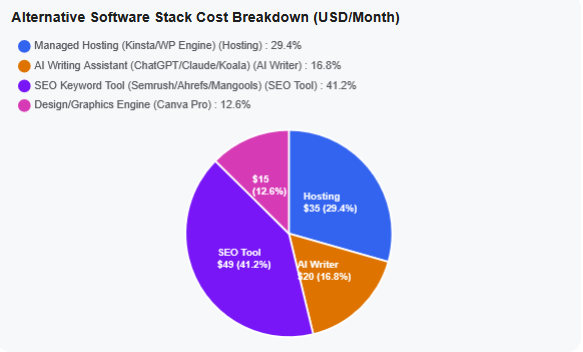
If you choose a traditional host like Kinsta or WP Engine, you must construct a “Software Stack” to replicate what Wealthy Affiliate now includes natively. This is where many solo entrepreneurs experience “stack fatigue” and unexpected budgetary inflation.
To get the exact same utility on a traditional host, a typical creator’s monthly invoice stack looks like this:
Software / Service Component
Traditional Host Equivalent
Estimated Monthly Cost
Managed WordPress Hosting
Kinsta, WP Engine, or SiteGround
$30.00 – $35.00 / month
Keyword & Niche Research Tool
Standalone tool (e.g., Ahrefs, Semrush, or Jaaxy Pro)
$99.00 / month
AI Content Writer & Assistant
Dedicated SaaS writer (e.g., Jasper, Copy.ai)
$49.00 / month
AI Image & Graphic Design Studio
Canva Pro / Midjourney Subscriptions
$25.00 / month
Link Management & Pretty Links Pro
Independent WordPress Plugin License
$16.00 / month (Amortized)
Estimated Total Stack Cost
Fragmented Toolset
~$219.00 / month
Fragmented subscriptions scale up overhead substantially compared to an all-in-one platform like Wealthy Affiliate.
For nearly two decades, Wealthy Affiliate operated as a foundational cornerstone of the online business education space.
However, as the digital landscape shifted rapidly toward artificial intelligence, search engine algorithms matured, and creators grew exhausted by “software fatigue” – the frustrating necessity of stringing together separate subscriptions for web hosting, keyword research, text editors, AI writers, and graphic design tools – the traditional learning model faced a tipping point.
The launch of the newly overhauled platform marks a fundamental pivot in the company’s philosophy. Wealthy Affiliate has transitioned from a legacy, step-by-step training course into a highly integrated, AI-native business operating system.
By embedding contextual intelligence directly into the server infrastructure and content creation workspaces, the platform aims to eliminate workflow fragmentation, and lower technical barriers
The Core Engine: Ace AI & Contextual Strategy --->
At the absolute center of this monumental upgrade is Ace, a persistent AI co-founder and personal business assistant.
Unlike general standalone language models that require users to repeatedly copy and paste context about their audience, Ace maintains a 360-degree memory of the user’s specific brands. Integrated seamlessly into the dashboard’s sidebar, it dynamically shifts its memory based on whichever website property the user is currently working on.
Rather than forcing users through rigid, one-size-fits-all text modules, the new “Learn” environment uses Ace to deliver non-linear, interactive training. The onboarding process is entirely conversational; users brainstorm their niche, select brand identities, and establish comprehensive business blueprints through low-friction dialogue. Ace then tracks real-world milestone execution, providing custom, on-demand sub-tutorials (such as building platform-specific social media game plans) tailored strictly to the user’s active domain assets.
Spoiler title
Operational management is anchored inside the reimagined “My Businesses” dashboard (which completely supersedes the older “Hubs” concept).
Here, distinct web properties are organized into visual tiles. Selecting a brand tile instantly configures the workspace’s entire content deck, keyword vaults, and analytics to match that specific niche. When it comes time to create, users transition into the Studio interface – a centralized workspace where all digital assets live side-by-side:
• The AI Article Designer: To eliminate robotic “AI fingerprints,” this tool utilizes an algorithmic outline generator. Users manually audit and refine structural headings (H2s/H3s) before any text is written. The underlying system then applies a highly customized Writing Voice Profile, built from analyzing the user’s previously published, polished articles to ensure the generated draft accurately mirrors their natural vocabulary, punctuation habits, and formatting preferences.
• Inline Media Integration: As the layout populates, the text canvas generates context-aware placeholders. Clicking these containers opens the AI Image Studio and DsgnPop Studio, which automatically read the surrounding text’s search intent to suggest wide-aspect blog headers, custom logos, or branded typography overlays without ever requiring an external design tool like Canva.
• Cross-Channel Social Strategy: From the exact same Studio project window, Ace extracts the article’s core thesis and automatically translates it into tailored social media copy – crafting visual hooks for Instagram, search-optimized descriptions for Pinterest, and structured multi-post threads for X (formerly Twitter) – while maintaining brand identity across channels.
Infrastructure, Resource Guardrails, and Pricing --->
Because the workspace bridges content generation directly with enterprise-level managed WordPress infrastructure, technical deployments are completely automated.
The “My Businesses” framework features a one-click NameGenuity domain registration engine that maps, points, and provisions domains instantly without requiring manual DNS configuration. Once connected, the host automatically deploys bank-grade DDoS shielding, real-time server-side malware filtering, free auto-renewing SSL encryption, and redundant “double-hosted” site mirroring to protect domains from outages.
This deep integration introduces a new, resource-based utility system: “The AI Credit Token Economy.”
Under this structure, basic text chat is regulated by a Daily Ace Message cap, while heavy asset creation (full article generation, keyword clustering, and visual media design) draws from a Monthly AI Credit Pool.
These resources scale directly across the platform’s four clear subscription tiers:
• Starter ($0): A free trial offering up to 20 daily messages, 1 practice site, and a one-time 4,000 credit starter pack to test the layout engine.
• Builder ($29/mo or $290/yr): Built for emerging creators, providing 1 live website, up to 100 daily messages, and 20,000 monthly credits.
• Premium ($49/mo or $490/yr): The core membership tier, unlocking 3 live websites, 100 daily messages, and a robust 40,000 monthly credits.
• Premium Plus+ ($99/mo or $990/yr): The power-user tier, granting 5 live websites, 200 daily messages, and a massive 100,000 monthly credit pool alongside dedicated Pro AI processing models.
If creators drain their monthly pools during aggressive content sprints, the dashboard offers on-demand top-up bundles (ranging from $5 for 5,000 credits to $25 for 50,000 credits) that can be purchased via standard billing or exchanged using internal Cash Credits earned through the community reward ecosystem. If a severe user error or plugin conflict ever breaks a live website, the platform’s specialized Site Support team operates 24/7/365 with back-end administrative privileges, allowing them to isolate broken code or execute full database rollbacks to a stable server snapshot in under five minutes.
The new platform upgrade represents an aggressive, highly competitive step forward that directly acknowledges the realities of modern digital publishing. Wealthy Affiliate has successfully evolved from an educational platform into a true technological utility. By unifying research, training, text generation, media design, and secure hosting into a single interconnected loop, the ecosystem successfully strips away the technical friction of managing an online business.
While the new credit token limits require mindful resource budgeting, and the deep ecosystem integration naturally increases long-term platform lock-in, the trade-off delivers an incredibly efficient, cohesive, and powerful environment. It provides modern affiliate marketers and content creators with a robust launchpad to scale multi-channel digital brands from a single, centralized command center.
Choose Wealthy Affiliate if: You want a single, clean bill, you rely heavily on integrated AI assistance to scale content, and you don’t want to manage separate software accounts or worry about technical DNS settings.
Choose an Alternative Host if: You already have established external tools (like Ahrefs or Canva), you require granular developer access, you need true one-click staging environments to test website code safely before going live, or your traffic scales to hundreds of thousands of monthly visitors where raw page speed overrides all else.
Deploying a robust AI policy is your first line of defense against operational drift and reputational collapse.
If you want to protect your digital assets, establish your own guardrails, or request an operational integrity audit, contact Paul Mindra to schedule a consultation, or explore deep-dive verification methodologies over at The Forensic Beacon.
To deploy active asset mitigation and risk strategies based on these behavioral indicators, execute the protocols found at Truth In Wealth.
To review the specific hardware, software, and verification tools utilized in these digital counter-measures, please monitor the updates here.
Defending against advanced synthetic loops requires proactive corporate governance. To evaluate your own defense posture or review how these forensic testing benchmarks are built directly into legal workflows, access my official Paul Mindra Internal AI Use & Operational Integrity Policy.
To provide the best experiences, we use technologies like cookies to store and/or access device information. Consenting to these technologies will allow us to process data such as browsing behavior or unique IDs on this site. Not consenting or withdrawing consent, may adversely affect certain features and functions.
Functional
Always active
The technical storage or access is strictly necessary for the legitimate purpose of enabling the use of a specific service explicitly requested by the subscriber or user, or for the sole purpose of carrying out the transmission of a communication over an electronic communications network.
Preferences
The technical storage or access is necessary for the legitimate purpose of storing preferences that are not requested by the subscriber or user.
Statistics
The technical storage or access that is used exclusively for statistical purposes.The technical storage or access that is used exclusively for anonymous statistical purposes. Without a subpoena, voluntary compliance on the part of your Internet Service Provider, or additional records from a third party, information stored or retrieved for this purpose alone cannot usually be used to identify you.
Marketing
The technical storage or access is required to create user profiles to send advertising, or to track the user on a website or across several websites for similar marketing purposes.